Pressure calculation on planks
We've recently implemented a feature that allows us to calculate the pressure on a given plank. This allows us to set a threshold whenever we want the plank to shatter (using the shatter implementation we recently made a post about). This is what it currently looks like if we manually increase the mass of our cube:
To accomplish this simulation, we used the physics formula for pressure which is:
P = -F/A
Where P is the pressure, F is the magnitude of the normal force and A is the area of the collision. To get P, we first of calculate the normal force using the following formula:
F = m*g*cos(theta)
Where m is the mass of the object, g is the gravitational field strength and theta is the angle of the inclined surface (currently only looking at the incline on the x-axis, we will be looking into expanding this to atleast one more axis). The mass of the object and constant g are easy to grab, theta however is generated by looking at the difference in rotation of the object that collided and the object it collided with. Once we have the magnitude of our normal force, we are ready to calculate the area of our collision.
Collision type objects in unity have a variable called 'contacts' which stores all the different contact points that triggered the collision. Being able to grab this from the OnCollisionStay method allows us to continuously grab the current contact points of the collision (since they can change this is very important). Now, since there are cases where the contact points don't make a perfect square we have to use a more generalised method to find the area of this quadrilateral. This is what we found:
Area = (p*q*sin(theta))/2
What p and q represents can easily be seen in this picture:
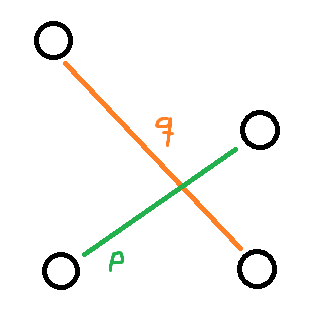 They are basically the vectors between the corners of our quadrilateral. Theta is the angle between these two, so to get that we use the following formula:
cos(theta) = (p • q) / (||p|| * ||q|| )
Using dot product and dividing that by the magnitude of both of our vectors we are able to get theta.
A question one might ask is, how do we know which contact points are "opposite of eachother" to get p and q? They are already ordered in a way in the contacts array that allows us to always grab the ones opposite to eachother every time, it all comes down to how Unity handles collision detection.
Now we have every component we need to calculate our force. The force is calculated 60 times per second (using FixedUpdate) where we check if it's above a given threshold and if so, we destroy the old plank and spawn the shattered version (as discussed in the previous blog post about our shatter effect).
References:
https://en.wikipedia.org/wiki/Pressure
https://en.wikipedia.org/wiki/Normal_force
https://en.wikipedia.org/wiki/Quadrilateral
To accomplish this simulation, we used the physics formula for pressure which is:
P = -F/A
Where P is the pressure, F is the magnitude of the normal force and A is the area of the collision. To get P, we first of calculate the normal force using the following formula:
F = m*g*cos(theta)
Where m is the mass of the object, g is the gravitational field strength and theta is the angle of the inclined surface (currently only looking at the incline on the x-axis, we will be looking into expanding this to atleast one more axis). The mass of the object and constant g are easy to grab, theta however is generated by looking at the difference in rotation of the object that collided and the object it collided with. Once we have the magnitude of our normal force, we are ready to calculate the area of our collision.
Collision type objects in unity have a variable called 'contacts' which stores all the different contact points that triggered the collision. Being able to grab this from the OnCollisionStay method allows us to continuously grab the current contact points of the collision (since they can change this is very important). Now, since there are cases where the contact points don't make a perfect square we have to use a more generalised method to find the area of this quadrilateral. This is what we found:
Area = (p*q*sin(theta))/2
What p and q represents can easily be seen in this picture:
cos(theta) = (p • q) / (||p|| * ||q|| )
Using dot product and dividing that by the magnitude of both of our vectors we are able to get theta.
A question one might ask is, how do we know which contact points are "opposite of eachother" to get p and q? They are already ordered in a way in the contacts array that allows us to always grab the ones opposite to eachother every time, it all comes down to how Unity handles collision detection.
Now we have every component we need to calculate our force. The force is calculated 60 times per second (using FixedUpdate) where we check if it's above a given threshold and if so, we destroy the old plank and spawn the shattered version (as discussed in the previous blog post about our shatter effect).
References:
https://en.wikipedia.org/wiki/Pressure
https://en.wikipedia.org/wiki/Normal_force
https://en.wikipedia.org/wiki/Quadrilateral
Kommentarer
Skicka en kommentar